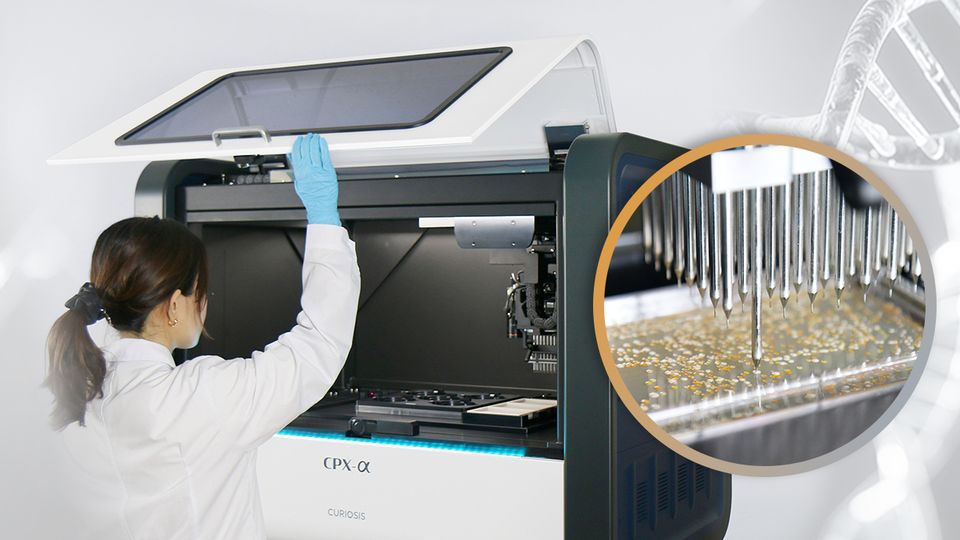
As synthetic biology programs scale, colony screening, selection, picking, inoculation, and sample tracking can become major workflow bottlenecks. Manual processes often limit throughput, introduce operator-dependent variability, and complicate colony traceability across source and destination plates.
This app note explores how automated, image-based colony handling can improve efficiency, support reproducible colony selection, and maintain traceable records throughout high-throughput cloning workflows.
Download this app note to discover a workflow that:
- Reduces repetitive manual handling
- Supports reliable, high-throughput colony processing
- Provides organized, traceable records to support downstream screening and analysis
CRAN015-2609 www.curi osis.com
APPLICATION NOTE
CPX™: An Automated Colony-Picking System for High-Throughput Cloning Workflows
Streamlining colony selection, picking, inoculation, and tracking for synthetic biology applications
◼
Introduction
Synthetic biology is increasingly recognized as a platform technology for developing new therapeutics, bio-based chemicals and materials, engineered microorganisms, and more sustainable manufacturing processes.1 Advances in DNA synthesis and genome editing, together with computational design, AI, and laboratory automation, are expanding the speed, scale, and complexity of biological design and experimentation.1,2 These capabilities support iterative design–build–test–learn workflows in which multiple genetic designs are constructed and experimentally evaluated.2 As these workflows scale, high-throughput cloning and screening play an increasingly important role in translating computational designs into experimentally validated biological systems.2,3
A typical cloning workflow includes transformation, plating and colony growth, colony screening and selection, colony picking and inoculation, cultivation, and downstream molecular analyses. Among these steps, colony selection, picking, and inoculation are often particularly labor-intensive and time-consuming. In a conventional manual workflow, researchers visually examine agar plates to identify suitable colonies, transfer each selected colony to culture medium in a destination vessel, and manually record its identity and location. Although practical for small-scale experiments, this approach becomes increasingly inefficient at larger scales due to limited throughput, operator-dependent variability, and difficulties in tracking colonies across multiple source and destination vessels. These challenges become increasingly significant when hundreds or thousands of colonies must be processed.
The newly introduced CPX™ automated colony-picking system addresses these challenges by integrating image-based colony detection and selection, high-throughput colony picking and inoculation, and sample tracking into a single workflow. By automating these steps, CPX™ increases throughput, reduces hands-on time, and maintains colony traceability from source to destination. This application note outlines the CPX™ workflow and its application to high-throughput cloning.
CRAN015-2609 www.curi osis.com
◼
CPX™ Workflow
CPX™, an automated colony-picking system, streamlines colony handling through a five-step workflow (Figure 1). First, the source and destination plates are loaded, and the plate layouts and operating parameters are configured (Step 1). The system then captures a high-resolution image of the source plate and detects individual colonies. Depending on the operation mode, target colonies are selected manually or automatically based on predefined criteria (Step 2). The selected colonies are picked using a fully motorized head with 96 sterile picking pins (Step 3) and inoculated into individual wells of the destination plate (Step 4). After picking is complete, users can review colony images, picking results, and source-to-destination tracking records and export the data for further analysis (Step 5). This integrated workflow reduces repetitive manual tasks while supporting efficient colony handling and reliable sample traceability. The following sections examine the key capabilities of CPX™ at each stage of the colony-picking process.
1.
Flexible source-to-destination plate configuration
Before picking, users select one of four destination strategies to determine how colonies from the source plates will be distributed across the destination plates (Figure 2A). These strategies support sequential plate filling, the assignment of one or multiple destination plates to each source plate, and repeated inoculation across multiple plates. Users can also specify which wells will be used for inoculation and reserve unused wells for negative controls or subsequent experimental steps (Figure 2B). During operation, colonies are inoculated sequentially into the selected wells according to the picking order, and CPX™ records the resulting source-to-destination mapping for result review and traceability. Together, these configuration options allow the workflow to accommodate a range of experimental designs.
Figure 1. Overview of the five-step CPX™ workflow
CRAN015-2609 www.curi osis.com
2.
High-resolution image-based colony detection and selection
CPX™ captures high-resolution images of each source plate for colony detection and analysis. With an imaging resolution of 100 pixels/mm, the system can detect colonies as small as approximately 200 μm in diameter. For each detected colony, CPX™ measures diameter, inter-colony distance, circularity, and axis ratio and uses these measurements to identify colonies that meet the user-defined selection criteria (Figure 3A).
The selection process differs depending on the operation mode. In Auto Operation Mode, users define the parameter thresholds before starting the run, and colony selection is performed automatically. In Manual Operation Mode, users can review the detection results in the Colony Selection window after imaging is complete (Figure 3B). They can verify which colonies meet the criteria and are selected for picking, adjust the colony filter settings, and manually add or remove individual colonies before picking begins.
Figure 2. Destination strategies and well plate layout configuration
(A) Four destination strategies are available. Fill All Wellplate sequentially processes all source plates and fills the available destination wells. One WellPlate Per Source assigns up to 96 colonies from each source plate to a single destination plate; any additional selected colonies are skipped. Multiple WellPlates Per Source assigns multiple destination plates to each source plate. Multi Inoculation inoculates colonies from one source plate into multiple destination plates through repeated dipping. (B) The destination layout interface allows users to set the number of destination plates and select wells for inoculation on each plate. Selected wells are highlighted in orange.
CRAN015-2609 www.curi osis.com
3.
High-throughput colony picking and simultaneous inoculation into multiple wells
CPX™ combines a high-speed XYZ stage with a fully motorized 96-pin head to perform sequential colony picking and simultaneous inoculation. Each selected colony is collected by an individual sterile pin, enabling up to 96 colonies per picking cycle. Once picking is complete, the pins are simultaneously dipped into the culture medium in the corresponding destination wells. Representative well layouts and the corresponding inoculated plates are shown in Figure 4A.
A path-planning algorithm further improves processing efficiency by optimizing the picking sequence. Coordinated control of the X, Y, and Z axes minimizes unnecessary stage movement and reduces the time required to reach each selected colony. Together, the optimized picking sequence and simultaneous inoculation into multiple wells increase overall colony-picking throughput.
To quantify the improvement in throughput, processing times for the manual and CPX™ workflows were compared based on an estimated workload of 1,000 colonies. The processing time for 1,000 colonies was 172 minutes for the manual workflow, compared with approximately 15 minutes for CPX™ (Figure 4B). This corresponds to a 91.3% reduction in processing time, with CPX™ achieving approximately 11.5-fold
Figure 3. Colony detection parameters and selection review
(A) Colony detection settings and schematic illustrations of four selection parameters: diameter, inter-colony distance, circularity, and axis ratio. These measurements are used to filter colonies based on user-defined thresholds. (B) Colony Selection window in Manual Operation Mode showing the source plate image, colony filter controls, selection status, and detection summary. Colonies meeting the selection criteria are shown with solid outlines, while excluded colonies are shown with dashed outlines. Hovering over an excluded colony displays its measured characteristics, with values that do not meet the selection criteria highlighted in red. The detection summary reports the numbers of total, detected, user-created, and selected colonies, along with the overall selection limit.
CRAN015-2609 www.curi osis.com
higher throughput than manual processing.
4.
Image-based picking verification, colony tracking, and data export
After picking, CPX™ captures a post-picking image of the same location on the source plate. Comparing the pre- and post-picking images reveals visible traces left by the picking pins at the selected colony locations (Figure 5A), providing visual confirmation of pin contact at the intended locations.
To support colony tracking, each selected colony is assigned a unique index. In the Picking Results window, the index of each colony picked from the source plate is linked to the corresponding destination plate and well where it was inoculated (Figure 5B). The same index is included in the Colony Information List along with the colony’s source plate coordinates and measured characteristics, including diameter, minimum inter-colony distance, circularity, and axis ratio. This information can be exported in Excel format for further review and sample management (Figure 5C). Together, the picking results and colony information support source-to-destination traceability throughout the colony-picking workflow.
Figure 4. Colony inoculation results and processing time comparison
(A) Representative user-defined well layouts (top) and the corresponding destination plates after inoculation and 20 h of incubation (bottom), showing colony growth in the selected wells. (B) Comparison of manual and CPX™ processing times. Three researchers each manually picked and inoculated approximately 100 colonies from separate source plates, while CPX™ processed approximately 300 colonies. The measured times were used to estimate the time required to process 1,000 colonies.
CRAN015-2609 www.curi osis.com
◼
Conclusion
As synthetic biology becomes increasingly iterative and data-driven, construct libraries continue to grow in scale and complexity, placing greater demands on wet-lab workflows. Efficient screening of these libraries requires the ability to handle large numbers of colonies consistently and reproducibly.
CPX™ addresses this challenge by integrating image-based colony detection and selection with automated picking, inoculation, verification, and data management. This integrated workflow reduces repetitive manual handling and supports reliable, high-throughput colony processing. By maintaining the link between each source colony and its corresponding destination, CPX™ also provides organized, traceable records to support downstream screening and analysis.
Figure 5. Post-picking verification and colony data review
(A) Source plate images acquired at the same location before (left) and after (right) picking. The post-picking image shows a visible trace left by the picking pin at the selected colony location. (B) Picking Results window linking the index of each picked colony to its corresponding destination plate and well. An enlarged view of the destination plate layout is shown below alongside the corresponding inoculated plate. (C) Colony Information List exported in Excel format, containing each colony’s index, source plate coordinates, and measured characteristics, including diameter, circularity, axis ratio, and minimum inter-colony distance.
CRAN015-2609 www.curi osis.com
◼
References
1.
Council for Science and Technology., “Report on engineering biology: Opportunities for the UK economy and national goals”, GOV.UK (2023).
2.
Douglas K. R. Robinson, Daniel Nadal, and Sari Hagimoto., “Synthetic biology, AI and automation: A forward-looking technology assessment”, OECD Science, Technology and Industry Policy Papers (2025).
3.
Qiang Zhang et al., “Integrating protein language models and automatic biofoundry for enhanced protein evolution”, Nat Commun vol 16, 1553 (2025).